


You can build a working AI Operating System for your business in 30 days by setting up one component per week around a single workflow. You don’t need a developer, a big budget or a new stack of subscriptions. You need a plan, and the discipline to finish one workflow before starting the next.
If you’re new to the idea, start with What Is an AI Operating System? It explains the five components this guide builds: the Brain, the content engine, vibe coding, data and automation.
By day 30 you will have:
- A Brain that knows your business and briefs every other tool
- A content workflow that turns one idea into posts for every channel
- At least one small internal tool built without code
- A live dashboard that replaces one manual spreadsheet
- Automations that move work between all of the above
Why 30 days? It is long enough to build something real and short enough that the team doesn’t lose momentum. One component per week also means each part is tested before the next one depends on it.
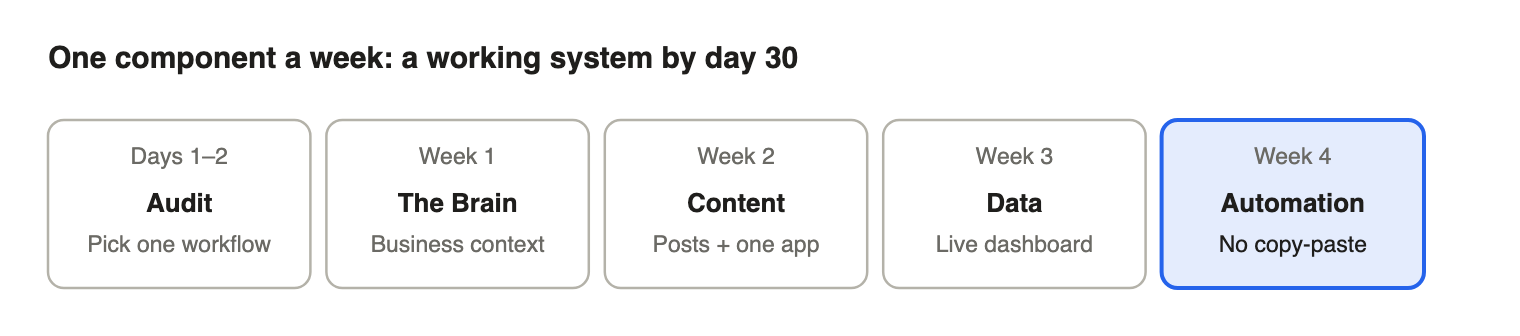
Before you start (Days 1–2): audit your tools and pick one workflow
The first two days decide whether the project succeeds. Skip them and you’ll automate the wrong things.
Step 1: List every AI and software tool you pay for
Write down each subscription, its monthly cost, who uses it and what for. Most SMEs find overlap, such as two AI writing tools or a paid design tool nobody opens. Cancel or consolidate before you build.
Step 2: Map one repetitive workflow end to end
Pick a workflow that happens every week, involves at least three tools or people, and has a clear output. Good first choices:
- Weekly social media promotion
- New lead follow-up
- Monthly sales reporting
- Customer enquiry replies
Write every step on paper, including the boring ones: “download file”, “send on WhatsApp”, “type into Excel”. Circle every manual hand-off. Those circles are what your AIOS will remove.
Step 3: Record a baseline
Note how many hours the workflow takes per week today. You’ll compare against this on day 30.
Week 1 (Days 3–7): Build the Brain
The Brain is the core AI model that holds your business context. Everything else depends on it, so it comes first.
Step 4: Choose one core AI model
Pick one main assistant for the whole team, such as ChatGPT, Claude or Gemini, on a business or team plan. One shared Brain beats five people using five different tools with five different prompts.
Step 5: Write your business context document
Create a single document the Brain reads before every task. Include:
- What you sell, prices and key selling points
- Target customers and their common questions
- Brand voice, with three examples of posts or messages you like
- Languages you publish in (for example English, Bahasa Malaysia, Chinese)
- Current goals for this quarter
Load it into a project, custom GPT or saved instructions so nobody has to re-explain the business.
Step 6: Build three reusable prompts
Write prompts for the tasks you repeat most, such as “plan next week’s promotion”, “reply to a customer complaint” and “summarise this report”. Save them where the whole team can find them.
Week 1 checkpoint: any team member can get on-brand output from the Brain without writing a long brief.
Week 2 (Days 8–14): Content engine and vibe-coded tools
Week 2 puts the Brain to work on output your customers see, plus one tool your team uses.
Step 7: Set up a one-idea, every-channel content flow
Start from a single idea from the Brain. Turn it into platform-specific versions: a carousel for Instagram, a short video script for TikTok, a post for Facebook or LinkedIn, and a WhatsApp broadcast. Use your design tool’s AI features for visuals, and keep templates locked to your brand colours and fonts.
Step 8: Create a content approval step
Decide who approves content before it goes live, and how. AI drafts; a human signs off. This keeps quality high and stops the “AI wrote something weird” moment.
Step 9: Vibe-code one internal tool
Use a vibe coding tool to build one small app your team needs. Describe it in plain language, for example: “a quotation form that calculates price based on quantity and adds SST”. Test it with real staff and fix what confuses them. New to this? Read What Is Vibe Coding?
Week 2 checkpoint: one week of content produced through the new flow, and one internal tool in daily use.
Week 3 (Days 15–21): Data and dashboards
Week 3 replaces one manual spreadsheet with a live dashboard, and gives the Brain real numbers to plan with.
Step 10: Pick the one report you update by hand most often
Common choices: weekly sales by outlet or product, lead sources, ad spend versus enquiries, or stock levels. Choose one. Don’t build five dashboards nobody reads.
Step 11: Connect the source data
Pull data straight from where it lives (POS, e-commerce platform, CRM, Google Sheets, ad accounts) instead of retyping it. Most platforms export to Google Sheets or connect to a dashboard tool directly.
Step 12: Let AI explain the numbers
Ask the Brain to read the dashboard each week and answer three questions: What changed? Why? What should we do next? That summary goes into Monday’s meeting.
Want to go deeper on analysis without code? See LEAD’s AI for Data Science Certification.
Week 3 checkpoint: one report that used to be built by hand now updates itself, with a weekly AI summary.
Week 4 (Days 22–30): Connect everything with automation
Week 4 is where separate tools become a system. Automation removes the manual hand-offs you circled in Step 2.
Step 13: Pick your automation tool
n8n, Zapier and Make all connect apps without code. Zapier is the easiest to start with, Make is visual and flexible, and n8n is the most powerful for AI workflows and can be self-hosted. Compare them in n8n vs Zapier vs Make.
Step 14: Automate the hand-offs, one at a time
Go back to your workflow map. For each circled hand-off, build one automation. Examples:
- New enquiry form submitted → Brain drafts a reply → sent to staff for approval on WhatsApp or email
- Approved content → scheduled to every channel automatically
- New sale in POS → dashboard updates → weekly summary sent every Monday
Test each automation for a few days before adding the next.
Step 15: Add an AI agent for one judgement task
Once the basics run, give an AI agent a task that needs some decision-making, such as sorting enquiries by urgency or flagging overdue invoices. Keep a human approval step for anything customer-facing. Learn more in What Is Agentic AI?
Step 16: Document the system (Day 30)
Write one page showing every tool, every automation, who owns it and what to do if it breaks. An AIOS only one person understands is a risk, not a system.
Week 4 checkpoint: your chosen workflow runs end to end with no copy-paste, and staff only review and approve.
5 mistakes that stall an AI Operating System
- Automating everything at once. One workflow done properly beats ten half-built ones.
- Skipping the Brain. Without shared business context, every tool produces generic output and staff stop trusting it.
- Buying more tools first. Most SMEs already own enough. Connect before you subscribe.
- Removing human approval too early. Keep a review step on anything customers see until the output is consistently right.
- One-person knowledge. If only one staff member knows how it works, the system leaves when they do. Document it and train a second owner.
How to measure success on day 30
Compare against the baseline you recorded in Step 3:
- Hours saved per week on the chosen workflow
- Manual hand-offs removed (count the circles that are gone)
- Output volume, such as posts published or leads followed up
- Response time to customers or leads
- Subscriptions cancelled after the tool audit
Once the first workflow is stable, pick the next one and repeat weeks 2 to 4. Each new workflow is faster because the Brain and automation layer already exist.
Build it with guidance
Prefer to build your AI Operating System with trainers and a cohort instead of alone? LEAD’s AI Operating System Certification takes you through all five components using your own business as the project. See the AI Operating System Certification [coming soon].
Frequently asked questions
Can a small business really build an AI Operating System in 30 days?
Yes, if you focus on one workflow. The 30-day plan builds a working first version; you then extend it to more workflows over the following months.
How much does it cost to build an AI Operating System?
Most SMEs can start with tools they already pay for: one AI assistant plan, a design tool, Google Sheets and an automation tool. The bigger cost is staff time in the first month, which the system pays back in hours saved.
Do I need to hire a developer?
No. No-code automation tools and vibe coding cover most SME needs. A developer only becomes useful for complex integrations with legacy systems.
Which workflow should I automate first?
Choose one that happens every week, involves three or more tools or people, and has a clear output, such as weekly promotions, lead follow-up or sales reporting.
What is the difference between this and just using ChatGPT?
ChatGPT alone does single tasks when someone asks. An AI Operating System connects that AI to your content, data and automation so work moves through the business without manual hand-offs. See What Is an AI Operating System?
0 Comments